Managing a field team without chasing it
A “where are you right now?” call neither builds a team nor gives an accurate picture. How do you follow a field team with a system that respects their time and gives management what it needs?
Every manager with a field team knows this call: “Where are you right now?” The manager asks because they do not know, the employee answers feeling distrusted, and neither comes away with accurate information. Managing a field team does not need more calls, but a system that makes the work itself visible, so nobody has to ask.
Why does follow-up by phone fail?
- It interrupts work: the rep is in a meeting with a customer and the phone rings with the manager’s question.
- It leaves no trace: what was said is not recorded, so no picture or decision can be built on it.
- It builds tension: good employees feel suspected, and careless ones learn ready-made answers.
A field team’s day in a clear system
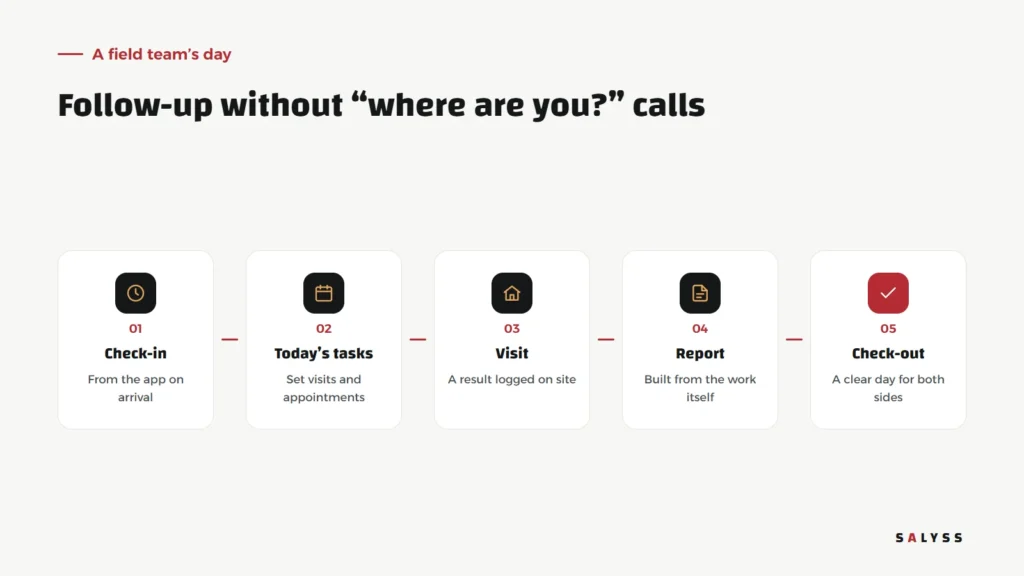
The day starts with an app check-in on arrival at the workplace. The employee sees today’s tasks: set visits and appointments. After each visit they log the outcome on the spot in a minute. At day’s end nobody writes a report, because the report was built from the work itself. Then they check out, and the day is clear to both sides.
Check-in: how does the app verify the workplace?
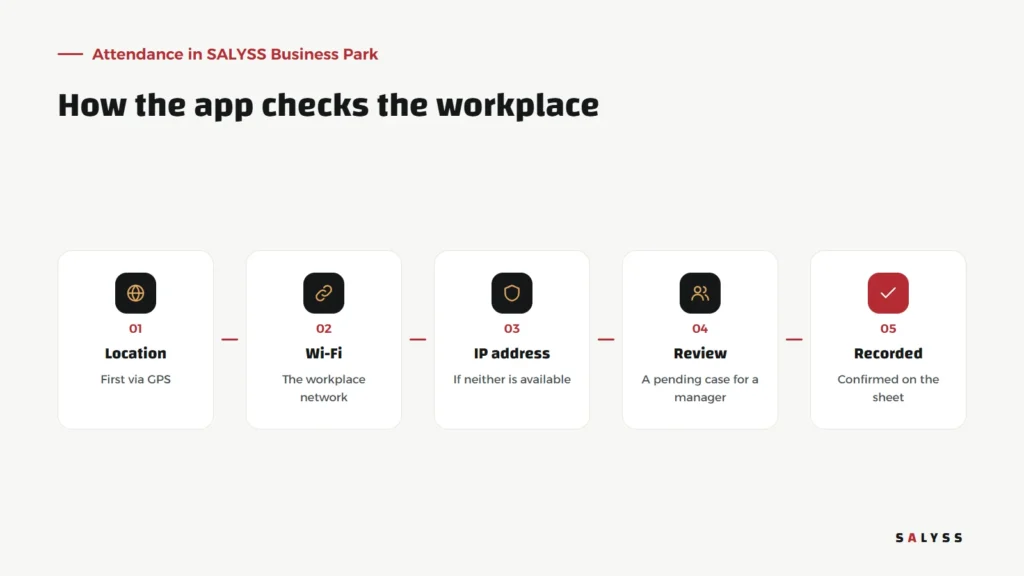
In SALYSS Business Park, a check-in button records attendance after verifying the workplace in stages: first location via GPS; if that is unavailable, the workplace Wi-Fi; then the IP address. If none can be verified, attendance is not automatically rejected; a pending case is recorded for a manager to review. That matters, because weak signal inside a building should not penalize a committed employee. The system also supports several workplaces, such as the head office and a project site.
Follow up through tasks, not tracking
There is a big difference between knowing where an employee is every minute and knowing what they achieved. The first is exhausting for both sides and of little use. The second is what a manager actually needs: how many visits happened, what came of them, and which customers need follow-up. When visits and outcomes are logged, the manager sees the real picture without watching anyone.
What does each side get?
- The employee: a clearer day, fewer calls, and work that shows without having to prove it.
- The manager: an accurate picture of attendance, visits and results, and an attendance sheet ready by period and department.
- The customer: a rep who knows their history with the company, because every previous visit is logged.
Pending cases: how to review them fairly
A pending case is not an accusation but a question that needs an answer. Set clear rules for reviewing them: who reviews, within how many days, and what counts as a valid reason. An employee visiting a customer outside the office is a different case from one who never arrived. Look for patterns in repeated cases: if one location always produces pending cases, the problem may be the network or the location settings, not the employees. Fair review is what makes the team trust the system.
How to introduce the system to the team
How you introduce the system decides its success. Presented as a control tool, the team will resist it. Presented as a replacement for calls and written reports, many will welcome it. Explain what will stop: calls asking about location, long daily reports, arguments about attendance times. Start with a trial period in which the manager reviews pending cases flexibly, so the team trusts that the system is fair.
Start with attendance
Attendance is the easiest starting point because everyone understands it, and results show in the first week. Tasks and visits can then be added gradually. Read about a sales team app, explore SALYSS Realty (page in Arabic), or book a free consultation.
Frequently asked questions
How does the app verify that the employee is at work?
In SALYSS Business Park it checks location first, then the workplace Wi-Fi, then the IP address; if none is available, a pending case is recorded for a manager to review.
Does this mean tracking employees all day?
No. Verification happens at check-in; follow-up during the day happens through logged tasks and visits, not continuous tracking.
Can there be more than one workplace?
Yes. The system supports several workplaces, such as the head office and a project site.